How to Tune a Ukulele: High G, Low G, and Baritone
← Back to Instrument tuning guides
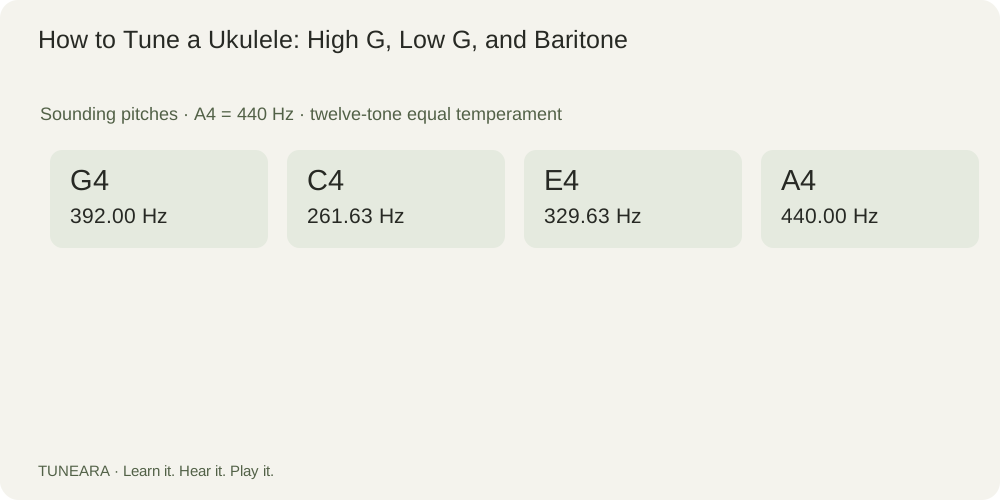
Common high-G ukulele tuning is G4–C4–E4–A4 in string 4-to-1 order. Low-G uses G3 instead; baritone commonly uses D3–G3–B3–E4.
How high-G and low-G ukulele tunings differ
High-G tuning is re-entrant: the fourth string is higher than neighboring C4 and E4 rather than the lowest pitch. That makes string order different from ascending pitch order. Many soprano, concert, and tenor instruments use it, but the instrument size alone does not prove the installed string set or tuning.
Compare GCEA frequencies with low G and baritone
At A4 = 440 Hz, high G4 is about 392.00 Hz, C4 261.63 Hz, E4 329.63 Hz, and A4 440.00 Hz. Low G3 is about 196.00 Hz. Baritone targets form another sequence, so a standard GCEA chord fingering produces a different sounding chord on a DGBE-tuned instrument.
Try it in practice
Identify the string set and intended tuning, then check each target in string-number order. Pluck one string while damping the others and approach pitch gradually. Compare high G and low G only on instruments or strings designed for those targets; use a teacher or technician if the installed string type is uncertain.
Avoid a common mistake
Do not obtain low G simply by loosening an arbitrary high-G string and assuming the result is suitable. Use a string intended for that job. Also do not call the fourth string the “lowest string” without qualification on a re-entrant instrument; refer to its number and intended octave.
Read the visual example
What to learn next
Connect this lesson to pitch, frequency, and cents, then try standard instrument targets.
References and further learning

Get Tuneara
Your next practice
starts here.
A free tuner and metronome for iPhone and Android.